- Published
- March 14, 2026
How to Choose User Friendly Life-Saving Tech


You know you need an Automated External Defibrillator. The statistics are sobering—for every minute without defibrillation, a person’s chance of survival drops by up to ten percent. But there’s a gap between knowing you need one and buying with confidence. The real question is, in a moment of pure panic, will you actually be able to use it? This is why it’s critical to choose user friendly features above all else. The right device acts as a calm, guiding partner when every second counts.
This concern is completely valid. It’s the single biggest hurdle for most families, school administrators, and small business owners. You aren’t just buying a piece of medical equipment; you’re investing in peace of mind and the ability to act decisively. This guide focuses on the specific features that transform an AED from an intimidating box into a life saving partner, ensuring that when the time comes, the answer to that question is a resounding yes.
What Does “User-Friendly” Actually Mean?
When we talk about a device being “user-friendly,” we’re going far beyond the basic question of whether it turns on and does its job. A user-friendly product is designed from the ground up to be intuitive and easy to understand, helping you get things done without frustration. Think about the difference between assembling a piece of furniture with clear, visual instructions versus one with a single page of confusing text. In a calm setting, the second option is annoying. In a cardiac emergency, that same level of confusion can be paralyzing. A user-friendly AED is one that feels like a calm, clear-headed partner guiding you through the chaos, not another problem you have to solve.
Beyond Just Being Functional
Every AED approved for sale is functional—it’s designed to analyze a heart rhythm and deliver a shock if needed. But functionality alone isn’t enough when your hands are shaking and your heart is pounding. A truly user-friendly AED anticipates your stress and confusion. It doesn’t just work; it works *with* you. It uses simple language, clear visual cues, and a logical sequence of steps that make sense even when you’re panicking. The goal is to eliminate guesswork so you can focus entirely on the person in front of you, confident that the device will show you exactly what to do next.
Helpful vs. Easy-to-Use vs. User-Friendly
You might hear these terms used interchangeably, but “user-friendly” is the one that matters most in an emergency. “Easy-to-use” might describe a device with few buttons, but it doesn’t guarantee you’ll know which one to press or when. “Helpful” could describe a feature like CPR feedback, but what if accessing that feature is complicated? “User-friendly” is the whole package. It means the device is not only simple and helpful but that its design is so intuitive you can operate it correctly without prior, in-depth training. It’s the gold standard for equipment meant for lay responders.
Common Words for Good and Bad Design
As you compare different AEDs, you’ll start to develop a sense of what makes for good and bad design. Good design is often described as intuitive, comprehensible, or accessible. An intuitive device feels natural to use, almost like you already know how it works. A comprehensible one gives you instructions that are impossible to misinterpret. An accessible AED can be used by people with varying abilities, perhaps with loud, clear voice prompts or bilingual options. On the flip side, a poorly designed device is confusing, complicated, or intimidating, creating barriers when you can least afford them.
The Hallmarks of a User-Friendly Product
So, what specific features should you look for that signal an AED is truly user-friendly? It’s not about flashy technology or a long list of capabilities. Instead, it’s about thoughtful design elements that work together to create a seamless and supportive experience for the rescuer. These hallmarks are what separate a basic device from one that actively empowers you to save a life. From the moment you open the case, a user-friendly AED should feel like it’s on your side, guiding you with clarity and purpose. Let’s break down exactly what those features are.
Consistency and Intuitive Design
An intuitive AED is one you can operate correctly without needing to stop and read a manual. The design should be consistent and logical. For example, pads, plugs, and buttons are often color-coded and numbered to guide you through the proper sequence: 1. Turn on the device. 2. Apply pads. 3. Plug in the connector. This simple, step-by-step process is built into the physical design of the device, making it easy to follow under pressure. The layout is clean and uncluttered, ensuring the most important elements are immediately obvious and leaving no room for confusion about what to do next.
Efficiency
In a sudden cardiac arrest, every second is critical. A user-friendly AED is designed for speed and efficiency. This starts with how quickly the device powers on and is ready to analyze the patient’s heart rhythm. It also includes features like pre-connected electrode pads that save you the step of plugging them in during the rescue. As one expert notes, user-friendly tools make work faster and less frustrating. For a rescuer, this efficiency isn’t about productivity—it’s about delivering a life-saving shock as quickly as possible, which directly improves the chance of survival.
Clear Feedback and Error Handling
What happens if you make a mistake? A user-friendly AED won’t let you fail. It provides clear, real-time feedback to keep you on track. This often comes in the form of calm, direct voice prompts that tell you exactly what to do, like “Apply pads to patient’s bare chest” or “Do not touch the patient.” Many modern devices also offer CPR coaching, giving you feedback on the rate and depth of your compressions. This guidance helps prevent common errors and ensures your actions are as effective as possible, turning a moment of uncertainty into one of controlled, confident action.
Accessibility
A great AED design considers the needs of all potential rescuers and the realities of chaotic environments. Accessibility means the device is effective for everyone, everywhere. This can include features like high-resolution, full-color screens that are easy to read in bright sunlight or dimly lit rooms. It also includes loud, clear audio prompts that can be heard over background noise. Some devices even offer bilingual capabilities, allowing the rescuer to switch languages with the touch of a button. These features ensure that anyone who steps up to help can do so effectively, regardless of their environment or native language.
Why User-Friendliness Is Critical in an Emergency
Understanding the features of a user-friendly AED is one thing, but appreciating why they are absolutely non-negotiable is another. An emergency is not the time to be deciphering a confusing interface or second-guessing your actions. The stress and adrenaline of the moment create a unique set of challenges that a well-designed device must overcome. The entire purpose of a public access defibrillator is to empower a bystander—someone just like you—to intervene confidently and effectively. User-friendliness isn’t a luxury feature; it’s the very foundation of what makes these devices work in the real world.
Reducing “User Friction” When Every Second Counts
In the world of product design, “user friction” refers to anything that makes a task harder to complete. A confusing button, an unclear instruction, or a complicated step all create friction. In an emergency, user friction is a dangerous obstacle. Every moment of hesitation or confusion is a moment lost. A user-friendly AED is designed to have as little friction as possible. The path from opening the device to delivering a shock is smooth, clear, and direct. By removing these potential roadblocks, the device allows you to act swiftly and decisively when it matters most.
Building Confidence in Lay Responders
Ultimately, the most important job of a user-friendly AED is to build your confidence. The fear of doing something wrong is often what keeps people from helping. A device that guides you with clear, simple instructions replaces that fear with empowerment. When the AED tells you exactly where to place the pads and when to press the button, it takes the burden of complex medical decisions off your shoulders. While formal CPR and AED training is the best way to prepare, a user-friendly device ensures that even an untrained bystander can be the hero the situation needs.
Why a User-Friendly AED Is a Must-Have
In a high stress emergency, complexity is the enemy. The American Heart Association emphasizes a three minute response time from collapse to the first shock for the best chance of survival. This leaves no room for hesitation or confusion. The best AED for a home, community center, or office isn’t necessarily the one with the most advanced technical specifications. It’s the one that an untrained person can operate effectively under immense pressure.
When you evaluate different models, every feature should be judged against one simple standard: does this make it easier for me to use quickly and correctly?
Clear Voice Prompts: Your Calm Guide in a Crisis
During a cardiac emergency, your own thought process can become scattered. A user-friendly AED acts as a calm, clear-headed coach, guiding you through every step. This is accomplished through high quality voice and visual prompts.
Look for devices that provide clear, simple, and paced verbal instructions. Commands like “remove all clothing from patient’s chest” or “apply pads to patient’s bare chest” eliminate guesswork. The tone should be calm and authoritative, not frantic, helping to lower the rescuer’s own stress levels. Many top models also include illuminated diagrams that light up to show you exactly what to do next, providing crucial visual reinforcement. This combination of hearing and seeing the next step is vital for ensuring you perform each action correctly.
Simple Pad Placement Saves Critical Seconds
One of the most common points of error for an untrained rescuer is placing the electrode pads correctly. In a moment of panic, fumbling with two separate pads, wires, and packaging can waste precious time. This is where modern pad design makes a significant difference.
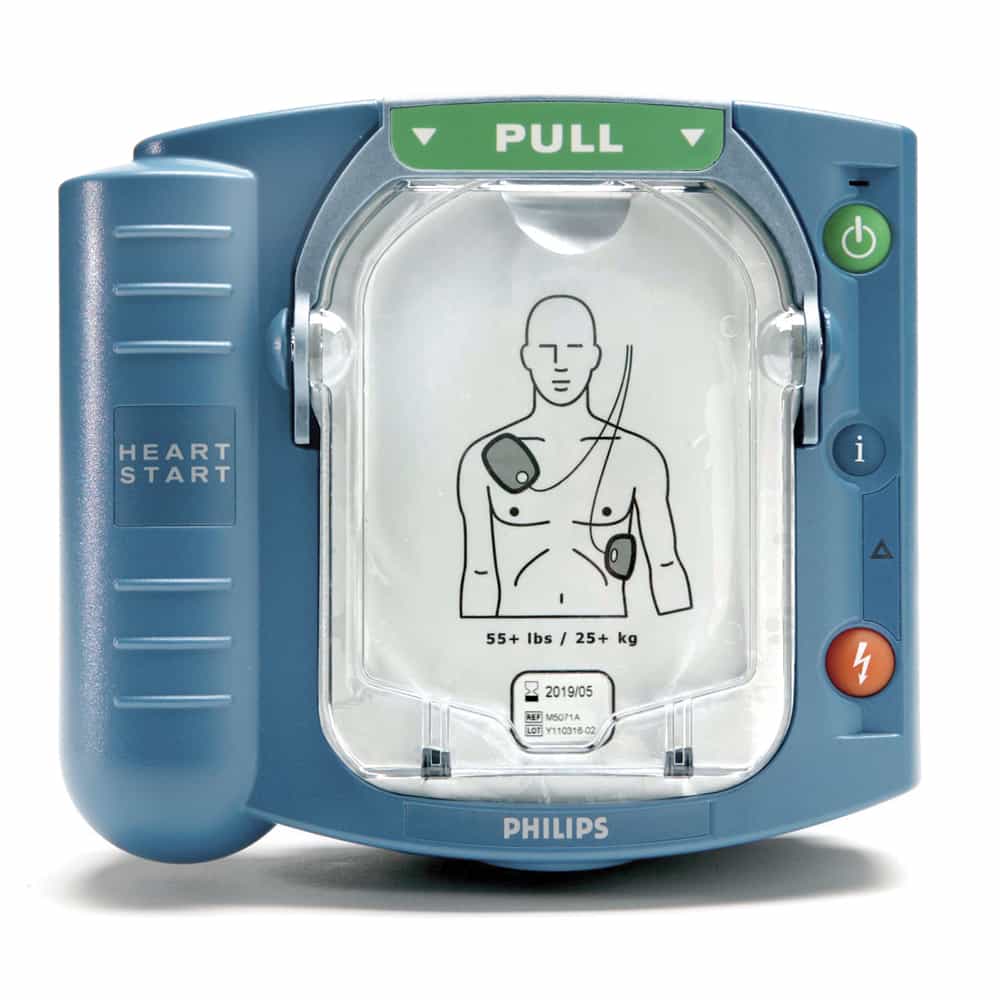
Some of the most intuitive devices, like the Philips HeartStart OnSite AED, utilize a single pad cartridge system. The two pads are housed in one convenient case. When you pull the handle, the packaging is removed and the pads are ready to be placed. The pads themselves have clear diagrams printed directly on them showing exactly where they go on the body. This design is practically foolproof and significantly speeds up the process from opening the AED to being ready to analyze the patient’s heart rhythm.
Automatic Shock: Taking the Guesswork Out of an Emergency
AEDs come in two primary types: semi automatic and fully automatic. A semi automatic device will analyze the heart rhythm and, if a shock is needed, will prompt the user to press a flashing button to deliver the shock. A fully automatic AED removes this step. It will provide a clear verbal warning to stand back and then deliver the shock on its own.
For a layperson, the act of pushing that shock button can be a moment of profound hesitation and self doubt. A fully automatic AED eliminates this burden. It makes the clinical decision and performs the action, allowing the rescuer to focus entirely on following the safety prompts. This single feature can be one of the greatest reliefs for a non medical user, ensuring the life saving shock is delivered without delay.
Self-Checks: How to Know Your AED Is Always Ready
An AED can sit unused on a wall for years. A hidden fear for many owners is that when an emergency finally happens, the device won’t work due to a dead battery or other malfunction. This is why automated self testing is a non-negotiable feature.
A reliable AED performs regular self checks on its battery, pads, and internal circuitry without you having to do anything. It then communicates its status through a simple, clear readiness indicator, usually a green light or symbol. A quick glance is all it takes to have confidence that your device is ready to perform. For organizations managing multiple devices, comprehensive AED program management can automate these checks and provide alerts, ensuring every device is compliant and ready to save a life.
How to Choose the Right User-Friendly AED
When you begin comparing models, you’ll see how these user-friendly features come together. For example, the Philips HeartStart OnSite is renowned for its intuitive design. It’s the only AED that is FDA approved for over the counter sale, a testament to its safety and simplicity for home use. Its single cartridge pad system and clear voice prompts are designed specifically for the layperson.
Similarly, models from the HeartSine Samaritan PAD line are known for their durability, simple two button operation, and combined battery and pad cartridges that simplify maintenance. By focusing your evaluation on these core usability features, clear instructions, simple pad design, automatic operation, and self testing you can cut through the noise and choose a device with confidence.
Ultimately, the best AED is the one you and those around you feel empowered to use. At Response Ready, we have spent over a decade helping families, schools, and businesses select the right device. We believe that saving a life should be accessible to everyone, and that starts with choosing a tool that inspires confidence, not fear.
Frequently asked questions
Q: Is an AED safe to use if I’m not a medical professional?
A: Yes, absolutely. Modern AEDs are designed with powerful safety features. The device will only advise and deliver a shock if it detects a shockable heart rhythm. It will not shock a person who has a normal heartbeat or who is in a state that a shock cannot help, making it safe for anyone to use.
Q: What if the person needing help is a child?
A: Most AEDs can be used on children. This is typically done with special pediatric electrode pads or a pediatric key that reduces the energy level of the shock. When purchasing your AED, you can easily add these child specific accessories to be fully prepared for any emergency.
Q: Do I need a prescription to buy an AED for my home?
A: For most AEDs, a prescription is required. However, the Philips HeartStart OnSite AED is the only model specifically approved by the FDA for over the counter sale directly to consumers, making it an exceptionally accessible option for home use.
Q: What is the total cost of owning an AED?
A: The initial purchase price is the main cost, but you should also plan for replacing the battery and electrode pads. These have a shelf life of anywhere from two to five years, depending on the model. This ongoing maintenance is essential to ensure your device is always ready.
Key Takeaways
- Choose clarity over complexity: The best AED for a layperson is not the one with the most buttons, but the one that provides simple, step-by-step guidance. Prioritize devices with clear voice prompts and an uncluttered design to ensure you can act correctly under pressure.
- Look for features that minimize guesswork: User-friendly elements like single-cartridge electrode pads and fully automatic shock delivery are designed to reduce hesitation and common errors, allowing you to focus on the person in need.
- Confirm your device is always ready: A crucial feature is automated self-testing, which regularly checks the battery, pads, and internal systems. A simple readiness indicator gives you confidence that your AED will work when you need it most.
Related Articles
- How to choose a user friendly AED for your home or business
- How to choose the easiest AED for your home or small business
- AED Machine 101: A Complete Buyer’s Guide
- The 6 Best AEDs: A Complete Buyer’s Guide
- Does your organization need an AED with ECG monitoring?
Disclaimer for information purposes only:
The information provided on this website is intended for general educational and informational purposes only. It is not medical advice and should not be used as a substitute for professional diagnosis, treatment, or care. Always consult a qualified healthcare or medical professional regarding any health-related questions or concerns.
While we strive to ensure the information shared is accurate and up to date, no guarantees are made regarding completeness, accuracy, or applicability to any individual situation. Use of this content is at the reader’s sole discretion and risk.
This website is part of the Response Ready family of emergency preparedness and training resources, including CPR & first aid training and compliance services, AED sales and program support, AED program management software, and medical oversight solutions provided through our affiliated platforms:
• CPR1.com
• AEDLeader.com
• AEDTotalSolution.com
• MDSIMedical.com
By accessing or using this website, you agree to release, indemnify, and hold harmless the website owners, authors, contributors, and affiliated entities from any claims, losses, damages, or liabilities arising from the use or reliance on the information presented.